Every learner gets the right support, at the right time.
Know every learner is getting their allocated support, and every aide is working within their contracted hours. Aidewise builds your teacher aide timetable in about a minute, so you stop rebuilding it by hand every time something changes.
Free for one school term. No card needed. Founding schools NZ$199 + GST for year one
Built by a New Zealand principal, and used in his own school.
Your teacher aide timetable for the week
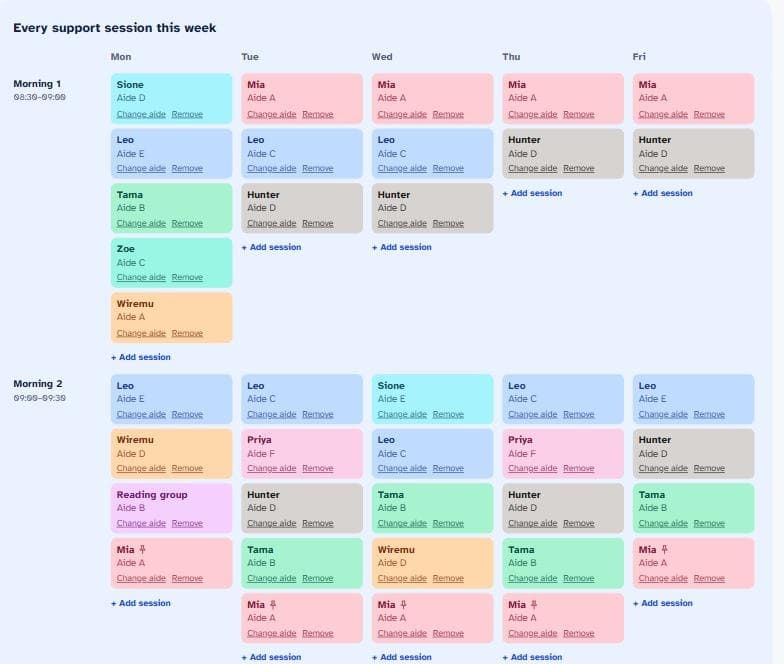
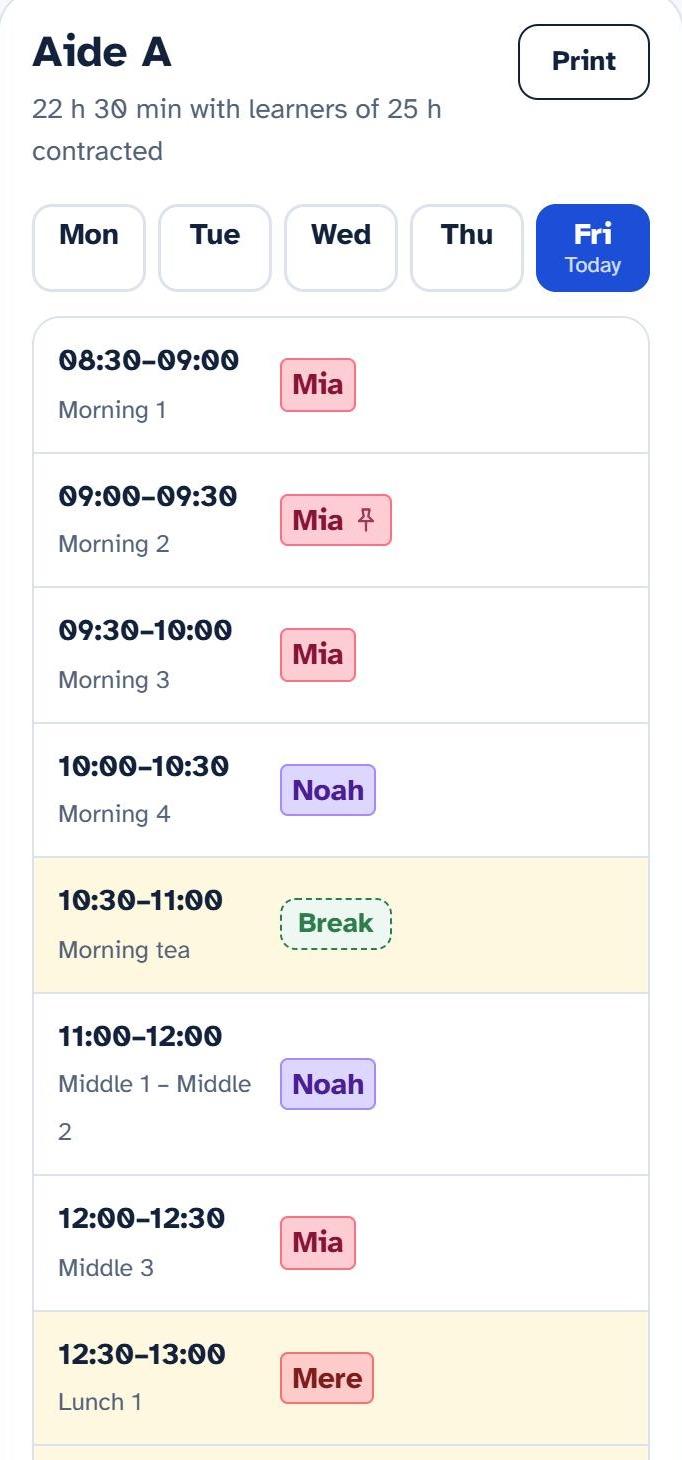
- 1Each learner in their own colour, with their aide underneath, Monday to Friday.
- 2Pinned sessions stay put when you change something and generate again.
- 3Each aide sees their own day on their phone, breaks included.
The timetable is the tool. Seeing clearly is the point.
Answers to the questions principals, SENCOs and boards ask
Is every learner getting their hours?
See who's missing out, and by how much
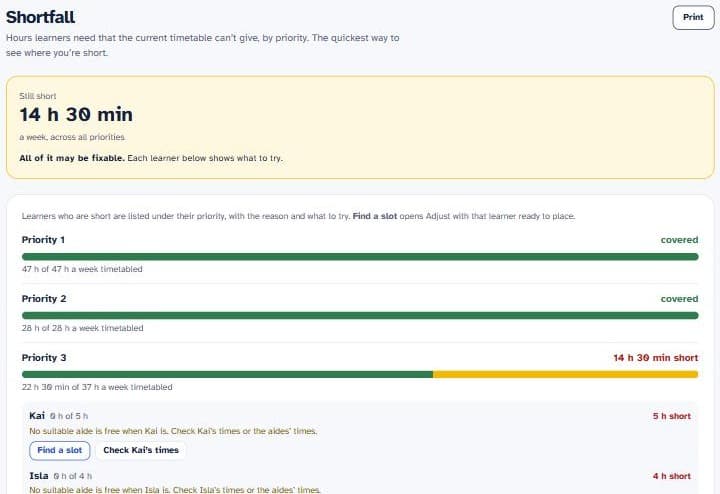
Most schools can't cover every hour they'd like. Aidewise lists every learner who is short, by priority, with how many hours, the reason, and what to try next.
- Priority 1 learners are placed first
- One reason per learner, such as no free aide at that time
- Find a slot opens the timetable with that learner ready to place
Coverage and Shortfall reports
Are our aides working the hours we pay for?
See which aides are over or under their contracted hours, and how their time splits between learners, breaks and other tasks.
Aide hours and Capacity reports
Can we show the board how funding is used?
Split each learner's hours across ORS, HHN, ICS and Board funding. See who pays for what, and what the Board tops up.
Funding and Board reports
What happens when an aide is away?
Mark them away, pick cover from whoever is free (best skill match first), and aides see the change on their phone.
Away and cover
Why not keep doing it by hand?
Most schools build the teacher aide timetable on paper, in Word or in a spreadsheet. It works, until something changes.
It never stays finished
An aide is away, a learner starts, a block moves, and the whole sheet needs redoing.
With Aidewise: change one thing and generate again. Your hand edits and fixed sessions stay where you put them.
Gaps are easy to miss
On paper it's hard to see which learner is quietly short of hours, or which aide has paid time with no one to support.
With Aidewise: every shortfall is listed by priority, with a link to find a slot.
It's hard to show it's fair
Boards, parents and staff want to know support is going where it's needed. Proving it takes hours of adding up.
With Aidewise: weekly records build up on their own, ready for a term or year report.
Already running a real school's timetable
A New Zealand primary school moved its whole teacher aide timetable into Aidewise this term.
Aidewise matched every session on their paper timetable, and every learner's set hours are covered.
5
teacher aides
11
learners
243
aide sessions a week
How it works
- 1
Set up once
Your school day, your aides (contract hours, skills, when they're available, other tasks such as Roaming) and your learners (weekly hours, priority, funding and any fixed sessions). Paste them in from a spreadsheet if you like.
- 2
Generate
Aidewise builds the whole week in about a minute: priority learners first, needs matched to skills, aides' breaks placed, contracts kept, and the same aide at the same time each day where it can.
- 3
Adjust and share
Drag a session to a new spot with instant fit checks, print a page for each aide or learner, and aides see their own day on their phone.
You stay in charge: Aidewise suggests, your SENCO or LSC decides.
What you'll get
Real screens from the demo school.
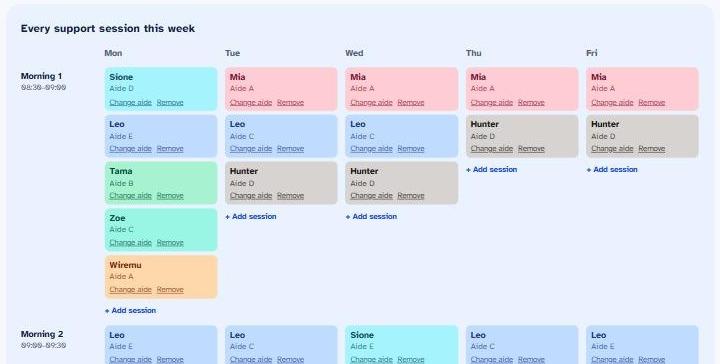
The whole week
Every learner, aide and break on one page, learner first, in that learner's colour.
Each aide's day on their phone
A simple list for the day, with breaks and fixed sessions marked.
Who's short, and why
Shortfall by priority, with one reason per learner and what to try next.
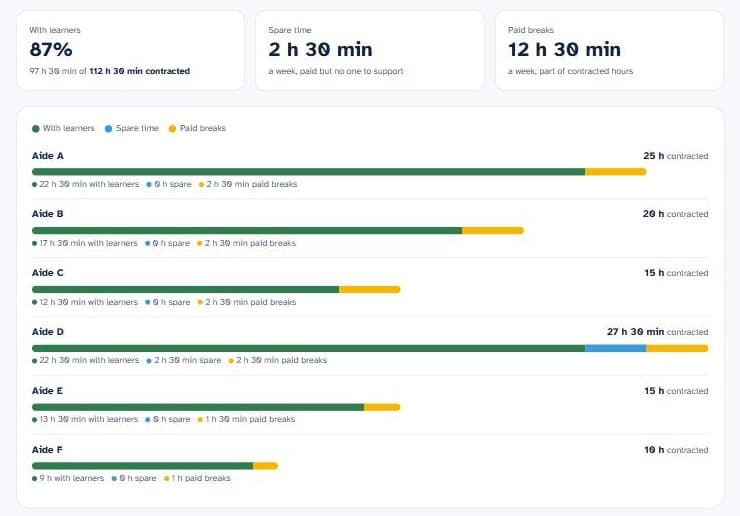
Every aide against their contract
Time with learners, spare time, paid breaks and other tasks, and anyone over or under.
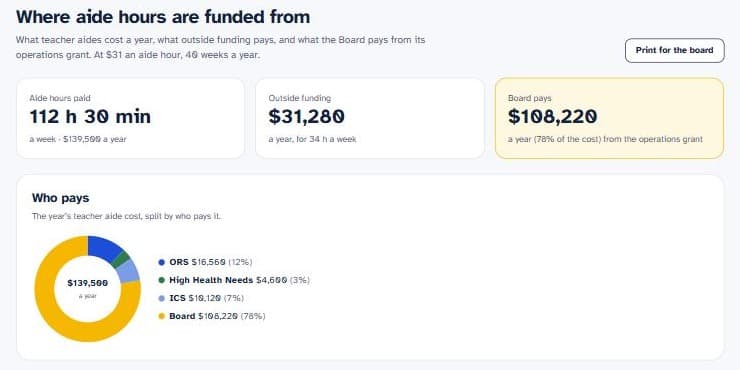
Funding, made clear
Outside funding such as ORS against what you really pay aides, and what the Board pays.
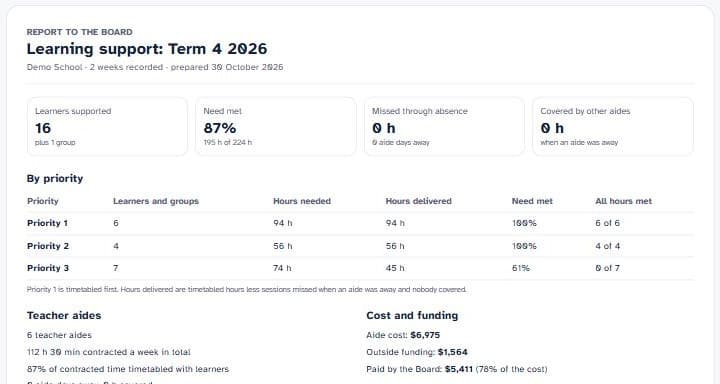
A report for your board
A term, month or year from your weekly records, ready to print. No learner or aide names.
Screens from the demo school, with made-up learners and aides.
Built around the people doing the work
Created by a New Zealand principal for New Zealand schools and kura.
For principals
- See that support goes where it's needed
- Aide hours checked against contracts
- Funding and Board reports, ready to table
For SENCOs and LSCs
- A full week in about a minute
- Small changes without starting again
- Cover for an absent aide in a few taps
For teacher aides
- Their own day on their phone
- Today's changes at the top
- Fair hours, with breaks in the right place
Built for learner privacy
Your school owns its data. Read the privacy policy.
- Stored in Sydney. Encrypted and backed up daily. Each school sees only its own data.
- Only what's needed. No dates of birth, addresses, NSNs or diagnoses.
- Yours to take or delete. Download everything or delete your school at any time.
- Board-ready. A plain-English privacy summary, ready to table.
Simple pricing
One price per school. Unlimited aides, learners and timetables. Free for one school term to try.
NZ$199 + GST, year one
- First 50 schools joining by the end of Term 1 2027
- Year two at a 25% supporters' discount
Standard
NZ$399 + GST a year
- Email support from Aidewise, here in New Zealand
- Start with a free trial for one school term
Questions
Does it work for ORS-funded learners?
Yes. Split each learner's hours across ORS, HHN, ICS, CESW, RFFP, Board funding or other sources. The Funding report shows who pays for what.
Can we report to our board?
Yes. Aidewise saves a record every week. The Board report covers a term, month or year, ready to print, with no learner names.
How long does setup take?
Most of the work is entering your aides and learners once, or pasting them in from a spreadsheet. After that, a new timetable takes about a minute.
Does it replace our judgement?
No. Aidewise does the fitting; your SENCO or LSC checks and adjusts. Hand edits and fixed sessions are kept when you generate again.
What happens when an aide is away?
Open Away & cover, tap who is away, and choose cover for each of their sessions from the aides who are free then. Aides covering see the change on their phone. Your weekly timetable stays as it is.
Can we try it first?
Yes. The free trial runs to the end of the next full school term and needs no card. Nothing is charged automatically: if you don't subscribe, your timetable becomes read-only, so you can still see and download everything. You can also look around a demo school without signing up.
Where is our information stored?
In Sydney, Australia, encrypted and backed up daily. The timetable engine works on it briefly in the United States and keeps nothing there. See the privacy policy for detail.
What if we stop using it?
Download all your data from the My school page. Aidewise deletes it 30 days after your account ends, or sooner if you ask.
See it with your own aides and learners
Free for one school term. Or look around the demo school first, no sign-up needed.